Garmin Xero C2 chronograph review
Our verdict: 4.3/5. The Garmin Xero C2 is a compact radar chronograph that sits beside your gun on a small tripod and reads each shot's velocity on its own screen, with no position offset to enter. Buy it if you shoot strings fast or want velocities on a Garmin watch or in an Applied Ballistics solver: Garmin's manual rates it at up to 10 shots per second in a rifle session, with rifle accuracy of plus or minus 0.1%. The catches are a built-in battery rated at up to 6 hours, a wider plus or minus 0.4% band for bows, pistols and air rifles, and watch support that depends on your model. Our Kestrel 5700 review and best long range rangefinder guide both note that a ballistic solver is only as good as the velocity you give it.
OpticsPlanet shows one review of the Xero C2, at 4/5. We card Garmin part number 010-03953-00 at around $700. Check price and availability on OpticsPlanet.
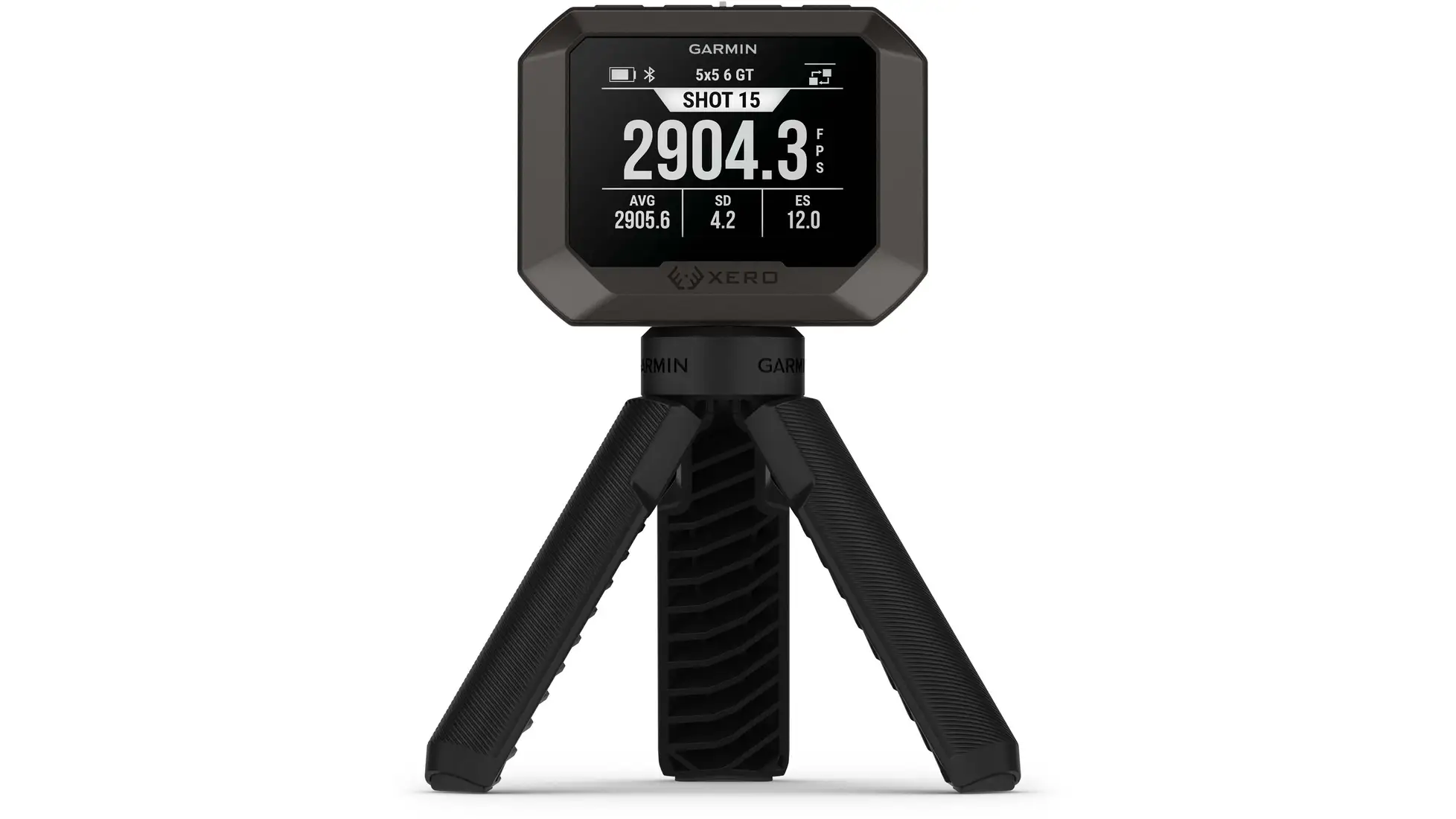
How we reviewed it: a research-based review built from Garmin's Xero C2 owner's manual (specifications, setup, shot data, connectivity, settings and troubleshooting pages), the specifications on Garmin's product page, the OpticsPlanet listing, and the single review on it. We have not used this chronograph ourselves; the score is our editorial opinion and the owner rating is shown attributed to its source. With one owner review, this page leans on Garmin's own documentation, and claims we could not confirm on Garmin's site are left out. See how we evaluate.
What the Xero C2 is
A chronograph measures how fast a projectile leaves the gun or bow. In its standard setup the Xero C2 needs nothing on the barrel and no screens to shoot through: Garmin's manual has you set it next to the rifle, point its large flat side at the target, and start a session. The device detects shots and displays measurements automatically as you shoot. The manual refers to the unit's radar, says it checks for interference from other radar systems when a session starts and switches to a clean channel automatically, and lists a 24.15 to 24.25 GHz band among its wireless frequencies.
Garmin's specs list what it tracks: rifles, pistols and other projectiles up to 5,000 FPS, air rifles up to 2,000 FPS, airsoft up to 1,000 FPS, and bows and crossbows up to 600 FPS. OpticsPlanet's listing gives the range as 100 fps to 5,000 fps and names bullets, arrows, bolts, slugs, paintballs, pellets and airsoft BBs. The manual's "other" session covers projectiles that fit no other category, such as some muzzleloading firearms, shotguns with slugs and slingshots.
Setup: where it goes and what it needs
- Rifle and air rifle. Position the gun within 5 to 15 inches of the chronograph, with the chronograph 5 to 15 inches behind the muzzle. Either side works, per Garmin's manual.
- Pistol and bow. Hold the barrel, or the arrow, 5 to 15 inches above the chronograph. For archery the manual calls for a target at least 4 yards away, and the reading is the arrow's speed as it passes over the unit.
- Clear path. The projectile must be able to travel at least 20 yards in front of the chronograph, with an unobstructed view of the target.
- Nearby shooters. The troubleshooting page says it can pick up shots from adjacent shooters, and recommends the nearest shooter be at least 5 feet from you.
- Blast and brass. Garmin warns to keep it out of the path of ejecting cartridge cases and muzzle blast.
The box includes a 1/4-20 thread tripod, and Garmin says the mount is compatible with most tripods. OpticsPlanet's listing describes a reinforced housing designed to withstand recoil when mounted to your firearm. Garmin's manual adds the trade-off: mounted to a rifle, the recorded velocity can read higher, because the rifle's backward movement during recoil offsets the numbers. Garmin says the difference is not noticeable in most cases, and up to 10 ft/sec on rifles with heavy recoil. Garmin's in-the-box list does not include a rifle mount.
Rapid fire, sessions and the numbers it shows
The headline spec is speed between shots. Garmin's manual lists up to 10 recorded shots per second in a rifle session and up to 3 in a pistol session, and its troubleshooting page lists exceeding that rate as one reason a shot is not detected. Saved sessions can be resumed from the menu, per the manual; OpticsPlanet's listing describes using that resume feature to shoot different firearms while the barrel cools off, or to test multiple bows or arrows, and keep the data separate.
On the device, Garmin lists kinetic energy at the muzzle, power factor, extreme spread, standard deviation and string average, and the manual's data fields add minimum, maximum and each shot's deviation from the average. Kinetic energy and power factor need the projectile weight entered at the start of a session. You can delete a shot from the list, and Garmin's specs say a shot can be excluded from the average and standard deviation on the device or in the app. The unit holds 200 sessions before a ShotView app sync is required to save data to the phone, per Garmin.
Garmin watch and Applied Ballistics pairing
This is the C2's connected side. Garmin's manual says a compatible Garmin watch can access session controls, view ballistics data and import recorded muzzle velocities into the Applied Ballistics ecosystem, and that Applied Ballistics integration pulls muzzle velocity straight into an Applied Ballistics solver, with long-range solutions delivered to a compatible device or the Applied Ballistics Quantum app. The phone side runs through Garmin's ShotView app, which, per Garmin's specs, is also where you add shot notes, session notes and clean or cold bore marks.
The word that matters is "compatible". The one OpticsPlanet reviewer took a star off over watch support, and the review names the series:
“Compatibility needs expanded to the descent Mk series watches”
M (IN), verified owner, Xero C2, via OpticsPlanet
If watch control is the reason you are buying, confirm your exact watch with Garmin first.
The one owner review
OpticsPlanet shows a single review of the Xero C2: four stars, dated February 27, 2026, from a reviewer tagged Verified Owner, who would recommend it. That is one person's experience, not a pattern. The pro they list is "Rapid fire readings". Beyond the watch point above, they add:
“It has the applied ballistics widget but no chronograph connectivity.”
M (IN), verified owner, Xero C2, via OpticsPlanet
“Backlight is a bit dim but that is probably for energy efficiency.”
M (IN), verified owner, Xero C2, via OpticsPlanet
For reference, Garmin's manual describes a backlight brightness setting with several levels you can cycle through, plus a backlight timeout and display color options. The review does not say which setting was in use.
Trade-offs, plainly
- The battery is internal and rated at up to 6 hours (Garmin); a full charge can take up to 5 hours, so charge before the range.
- Garmin's accuracy band is plus or minus 0.4% for bows, pistols and air rifles, against 0.1% for rifles.
- Rapid fire is rifle-session speed: Garmin lists up to 3 shots per second in a pistol session.
- Mounted on a heavy-recoiling rifle, readings can run up to 10 ft/sec high, per Garmin's manual.
- It needs at least 20 yards of clear flight in front of it, and adjacent shooters closer than 5 feet can register.
- Watch control works only with compatible Garmin watches; the one reviewer wants Descent Mk support.
- One reviewer finds the backlight a bit dim.
Key specifications
| Spec | Garmin Xero C2 (010-03953-00) |
|---|---|
| Rifle accuracy (Garmin manual) | +/- 0.1% of the target velocity |
| Bow, pistol and air rifle accuracy (Garmin manual) | +/- 0.4% of the target velocity |
| Maximum shots recorded per second (Garmin manual) | Rifle session up to 10; pistol session up to 3 |
| Velocity tracking (Garmin) | Rifles, pistols and other projectiles up to 5,000 FPS; air rifles up to 2,000 FPS; airsoft up to 1,000 FPS; bows and crossbows up to 600 FPS |
| On-device calculations (Garmin) | Kinetic energy at muzzle, power factor, extreme spread, standard deviation, string average |
| Memory (Garmin) | 200 sessions before a ShotView app sync is required to save data to phone |
| Display (Garmin) | Sunlight-visible, transflective, monochrome; 1.3 x 1.7 in, 2.2 in diagonal; 240 x 320 pixels |
| Battery (Garmin) | Internal rechargeable lithium-ion, up to 6 hours; USB-C |
| Connectivity (Garmin) | Bluetooth; ShotView app (product page); pairs with compatible Garmin watches (manual) |
| Water rating (Garmin) | IPX7 (manual: incidental exposure to water up to 1 m for up to 30 min) |
| Operating temperature (Garmin) | 14 to 131 degrees F (-10 to 55 degrees C) |
| Size (Garmin) | 3.03 x 2.38 x 1.36 in without tripod; 5.1 x 4.5 x 5.5 in with tripod |
| Weight (Garmin) | 123.2 g without tripod; 178.2 g with tripod |
| Tripod thread (Garmin) | 1/4-20 |
| In the box (Garmin) | Xero C2 chronograph, protective cover, 1/4-20 thread tripod, charging/data cable, documentation |
| OpticsPlanet row we card | Garmin part number 010-03953-00 (single row) |
| Price (OpticsPlanet) | around $700 |
Accuracy, shots per second and the IPX7 depth note are from the specifications page of Garmin's Xero C2 owner's manual; the other rows are from the specifications on Garmin's product page for part number 010-03953-00. OpticsPlanet's spec table lists a weight of 132 g without saying whether the tripod is included; we print Garmin's figures. OpticsPlanet also lists the Garmin Xero C1 Pro, a different model; nothing on this page describes it. No editorial award is claimed.
Should you buy it?
- Buy the Xero C2 if you shoot fast strings, run several rifles or bows in one range trip, or want velocities on a compatible Garmin watch and in an Applied Ballistics solver.
- Check two things first if you shoot pistol or archery (Garmin's 0.4% band and the 3 shots per second pistol limit) or if watch control is the draw (your watch model).
- Feeding a weather meter solver? Our Kestrel 5700 review covers a handheld solver whose owners warn that its answer is only as good as the data you enter, velocity included.
- Choosing a ballistic rangefinder? The best long range rangefinder guide relays one owner's point that truing a solver properly needs chronograph access.
- Shooting a crossbow? Our best crossbow scope guide explains speed-calibrated reticles that you set to your measured bolt velocity.
FAQ
How accurate is the Garmin Xero C2?
Garmin's owner's manual lists rifle measurement accuracy of plus or minus 0.1% of the target velocity, and plus or minus 0.4% for bow, pistol and air rifle. The same manual notes that when the chronograph is mounted to a rifle, recoil can make the recorded velocity read slightly higher, by up to 10 ft/sec on rifles with heavy recoil.
Where do you put the Xero C2 when you shoot?
Next to the gun for a rifle, or under the barrel or arrow for a pistol or bow. For a rifle, Garmin's manual says to position the rifle within 5 to 15 inches of the chronograph, with the chronograph 5 to 15 inches behind the muzzle, on either side. For a pistol or a bow, the barrel or arrow goes 5 to 15 inches above the unit. Point the large flat side at the target with the screen facing you, and make sure the projectile can travel at least 20 yards in front of it. No position offset needs to be entered.
Can the Garmin Xero C2 measure arrows and crossbow bolts?
Yes. Garmin's specs say it tracks bows and crossbows up to 600 FPS. For archery the manual says to use a target at least 4 yards away and hold the bow so the arrow is 5 to 15 inches above the chronograph, and it notes that the measured velocity is the speed of the arrow as it passes over the chronograph.
Does the Xero C2 work with a Garmin watch and Applied Ballistics?
Garmin's manual says you can pair it with a compatible Garmin watch to access session controls, view ballistics data and import recorded muzzle velocities into the Applied Ballistics ecosystem, and pull muzzle velocity straight into an Applied Ballistics solver, with long-range solutions delivered to a compatible device or the Applied Ballistics Quantum app. Compatibility depends on the watch: the one OpticsPlanet reviewer asks for support on Descent Mk series watches. Check your watch model with Garmin before you buy for this feature.
How long does the Xero C2 battery last?
Garmin lists an internal rechargeable lithium-ion battery with up to 6 hours of battery life, charged over USB-C. OpticsPlanet's listing puts it at up to 2,000 shots or up to 6 hours. Garmin's manual says a full charge can take up to 5 hours and that the device will not charge outside 32 to 113 degrees F.