Garmin Xero C1 Pro chronograph review
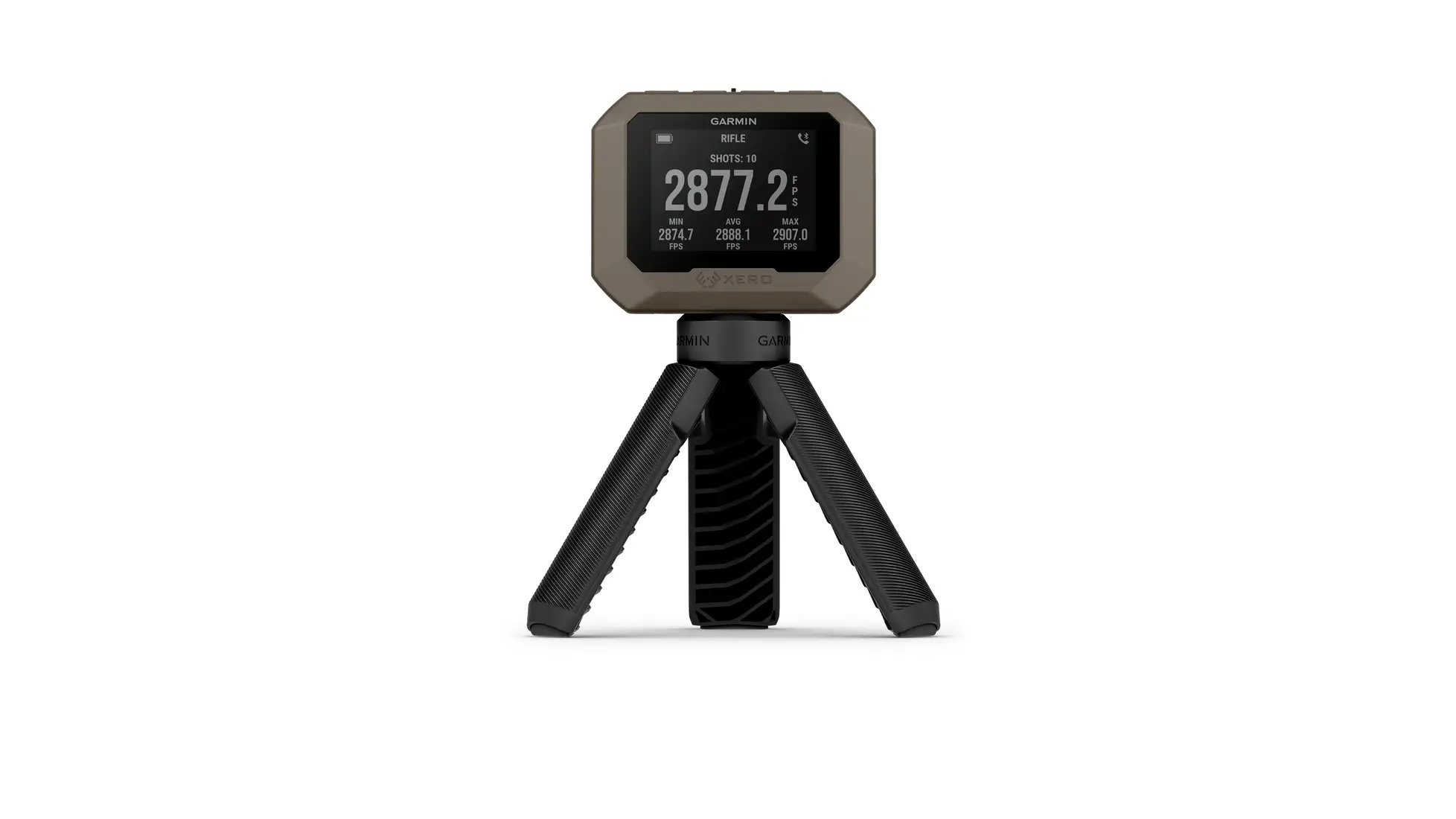
Our verdict: 4.4/5. The Garmin Xero C1 Pro is a small radar chronograph that sits on a mini tripod beside your rifle, or under your pistol or arrow, and shows each shot's velocity on its own screen with no position offset to enter. Garmin's manual rates it at plus or minus 0.1% for rifles and 0.4% for bows, pistols and air rifles, and OpticsPlanet shoppers rate it 4.9 out of 5 across 105 reviews, 76 of which describe it, its setup or its app as easy, simple, intuitive or user friendly. Buy it for load development and slow, deliberate strings. The catches: neither Garmin's product page nor its C1 Pro manual lists a shots-per-second rating, and two reviewers say it is slow between shots; the battery is sealed in, and the box has no case. If you shoot fast strings, or want a chronograph that pairs with a Garmin watch (neither edition of the C1 Pro manual has a watch-pairing section), read our Garmin Xero C2 review first; the Kestrel 5700 review shows where a measured velocity goes next.
OpticsPlanet shoppers rate the Xero C1 Pro 4.9/5 from 105 reviews. We card Garmin part number 010-02618-10, the chronograph alone, at around $400. Check price and availability on OpticsPlanet.
How we reviewed it: a research-based review built from Garmin's Xero C1 Pro product page and specifications, two editions of its owner's manual, Garmin's support articles on placement, mounting, room needed and indoor ranges, the OpticsPlanet listing, and all 105 reviews on it. We have not used this chronograph ourselves; the score is our editorial opinion and the owner rating is shown attributed to its source. Claims we could not confirm on a Garmin page are left out. See how we evaluate.
What the Xero C1 Pro is
A chronograph measures how fast a projectile leaves the gun or bow. The Xero C1 Pro does it without screens to shoot through and without anything clamped to the barrel: Garmin's support article says it "does not require mounting to your firearm or bow" and sits on a tripod with the radar facing the direction of fire. The radar side is the flat side with the Garmin logo, opposite the screen. Garmin's manual says that when a session starts it checks for interference from other radars and switches to a clean channel automatically, and that it uses an algorithm that needs no position input to measure true muzzle velocity.
Garmin's product page gives the speed range as 100 fps to 5,000 fps "for bullets, arrows, slugs, airsoft BBs, pellets and paintballs", and its specs split the ceiling by projectile type: rifles, pistols and other projectiles up to 5,000 FPS, air rifles up to 2,000, airsoft up to 1,000, and bows and crossbows up to 600. The manual's "other" session covers projectiles such as some muzzleloading firearms, shotguns with slugs and slingshots. Garmin also says that because the unit is not triggered by muzzle blast, it picks up shots from suppressed firearms and from firearms with muzzle brakes or compensators, and that since nothing attaches to the firearm it will not affect your zero or barrel harmonics.
Setup: where it goes and how much room it needs
- Rifle and air rifle. Position the gun within 5 to 15 inches of the chronograph, with the chronograph 5 to 15 inches behind the muzzle. Either side works, per Garmin's manual.
- Pistol and bow. Hold the barrel, or the arrow, 5 to 15 inches above the chronograph. The reading for an arrow is its speed as it passes over the unit.
- Room in front. The manual says the projectile must be able to travel at least 20 yards in front of the chronograph. Garmin's support article on room needed says about 20 yards is for fast projectiles like rifle bullets, that slower, bigger projectiles such as 9mm bullets or arrows need less, and that arrows can typically be tracked in about 8 yards.
- Archery distance. The manual asks for an archery target at least 4 yards away; Garmin's support article on recording shot data says a bow requires a minimum of 8 yards for a velocity reading. If you set up a bow lane, the longer of the two figures is the safer plan (our suggestion).
- Nearby shooters. It can pick up shots from adjacent shooters; Garmin recommends the nearest shooter be at least 5 feet from you.
- Blast and brass. Keep it out of the path of ejecting cartridge cases and muzzle blast, per the manual.
Garmin's product page also says indoor and outdoor operation is simple, and its support article on indoor ranges lists what makes them harder: other shooters nearby, reflective surfaces and other electronics. Its tips: set the right speed range for your ammunition, keep the target far enough away, a separation of at least 5 feet from other shooters is preferable, and try moving the chronograph left, right, forward, back, up or down.
Rifle mounting and the two kits
Garmin's in-the-box list has a 1/4-20 thread tripod and no rifle mount. On mounting, Garmin's support article says Garmin "did not specifically design or test the use of this product to be mounted to a rifle", that aftermarket manufacturers have tested it on a variety of rifle calibers and it "has worked without issue", and that "Garmin does not warranty the product when used in a manner outside of the design content."
OpticsPlanet's listing sells the same chronograph three ways: alone (the row we card), with a Kinetic Development Group Kinect M-LOK Garmin Xero C1 Mount, or with an Area 419 Arcalock Arm with QD clamp. The mounts are third-party parts and we say nothing about them beyond their names. OpticsPlanet's spec table also lists "Billet Aluminum" and "M-LOK" lines that Garmin's specs for the chronograph do not include, and a weight of 3.3 oz that differs from Garmin's; this page uses Garmin's figures.
Accuracy, and what Garmin does not publish
Both editions of the owner's manual list rifle measurement accuracy of plus or minus 0.1% of the target velocity, and plus or minus 0.4% for bow, pistol and air rifle. As arithmetic: 0.1% of 3,000 fps is 3 fps, and 0.4% of a 300 fps arrow is 1.2 fps. That is Garmin's rating, not a test of ours.
Two things are missing from the C1 Pro documents we read. First, there is no shots-per-second figure in the manual's specifications. Two reviewers describe the limit in practice:
“It will NOT register all the shots if you are rapid firing--as in controlled pairs.”
wlwood (NC), verified owner, 4 stars, via OpticsPlanet
The same reviewer adds that it "seems to want a couple of seconds between each shot", and a second reviewer lists "slow between shot times" among the cons. For comparison, Garmin's Xero C2 manual lists up to 10 recorded shots per second in a rifle session; our Xero C1 Pro vs C2 comparison sets the two side by side.
Second, Garmin does not say where along the bullet's path the reading is taken. The reviewer above put it this way:
“We also do not know where in the trajectory the velocity measurement is being taken.”
wlwood (NC), verified owner, 4 stars, via OpticsPlanet
Garmin's specs do say the unit calculates kinetic energy at the muzzle, and the manual says the algorithm measures true muzzle velocity. The reviewer had asked Garmin for timing details; the review does not report an answer.
Sessions, data and the ShotView app
You start a session by choosing bow, rifle, pistol, air rifle or other, then a velocity range where offered. With projectile weight entry turned on in Pro Settings, it calculates kinetic energy and, outside the other session, power factor. Garmin lists extreme spread, standard deviation and string average on the device, and the manual's data fields add minimum, maximum and each shot's deviation from the average. You can delete a shot from the shot list, and pause a session and resume it later.
The unit holds 50 sessions at a maximum of 100 shots per round before a ShotView app sync is required to save data to the phone, per Garmin's specs. Pairing goes through the ShotView app rather than the phone's Bluetooth menu, and the manual's setup steps include signing in to a Garmin account. Garmin's specs put shot notes, session notes, clean or cold bore marks and excluding a shot from the average and standard deviation in the app. Software updates arrive through the app or Garmin Express on a computer.
The US English edition of Garmin's owner's manual (titled Xero C1 Owner's Manual, April 2025), the one Garmin's US support page for part number 010-02618-10 links as its Owner's Manual, also lists a Downrange Mode under Pro Settings. In Garmin's words, it "Sets the screen to flash five times after the chronograph detects a shot", which can help when you use the device to track velocity downrange, with Garmin's warning to follow the safety protocols of the area where you shoot. The March 2025 English edition we also read does not list it, so check the Pro Settings menu on your unit.
The app draws the sharpest criticism in the reviews. The only review below four stars praises the hardware and faults the software:
“The chronograph itself is great. Nary misses a shot.”
Ron Stearns (AR), 2 stars, via OpticsPlanet
“The Garmin Shot View app is virtually worthless.”
Ron Stearns (AR), 2 stars, via OpticsPlanet
Their complaint is about labeling, collating and deleting sessions, one at a time on the device or by clearing the app's data. Three other reviews touch the software more lightly: one wishes the app had more features, one wants a shortcut from one session to the next, and one needed a call to Garmin support to get past account creation on an iPhone.
What 105 OpticsPlanet reviews say
OpticsPlanet shows 105 reviews at 4.9 out of 5: 98 five-star, 6 four-star and 1 two-star, with no one- or three-star reviews. They run from December 2023 to September 2026, and 94 carry the Verified Owner tag. The pool skews heavily positive, so the counts below matter more than the average.
- Easy to set up and use. 76 of the 105 reviews (70 distinct reviewer name and state pairs) describe it, its setup or its app as easy, simple, intuitive or user friendly.
- Price. 17 of the 105 reviews name the price as a drawback in their Cons field, all of them five-star reviews.
- No case. 5 reviews say a case should be in the box.
- Fast shooting. 2 reviews say it does not keep up with quick follow-up shots.
- Indoor ranges. 4 reviews describe indoor sessions with other shooters nearby; none says the neighbors' shots ended up in their string.
- Side-by-side checks. 3 reviews compare its readings with another chronograph, in the reviewers' own words below.
“Compared to Lab Radar readings +/- 5-8 fps.”
Texan (TX), verified owner, via OpticsPlanet
“Compare the two, and they are within 3feet/sec.”
Jia (CA), verified owner, comparing with a magneto, via OpticsPlanet
Those are single reviewers' comparisons, not a test of ours. Two more reviews speak to conditions Garmin's pages also cover, suppressors and indoor lanes:
“Used with three different rifles and two different suppressors.”
shawn (MN), verified owner, via OpticsPlanet
“Indoors it is very good at not reading shots in nearby shooters.”
Justin (KY), verified owner, via OpticsPlanet
On the box contents, one four-star reviewer sums up the case complaint, and another four-star reviewer adds a second small one:
“The only thing really missing out of the box should be an included case.”
Finn (OH), verified owner, 4 stars, via OpticsPlanet
“However, the unit is expensive and the screen is very small.”
Bill (FL), verified owner, 4 stars, via OpticsPlanet
Trade-offs, plainly
- No shots-per-second rating in Garmin's C1 Pro manual, and two reviewers say it misses quick follow-up shots.
- The battery is internal and nonreplaceable (Garmin), rated for up to 2,000 shots or up to 6 hours; a full charge can take up to 4 hours.
- It needs about 20 yards of clear flight for rifle bullets, and Garmin's two pages give 4 and 8 yards for archery.
- Garmin did not specifically design or test it for rifle mounting and does not warranty use outside its design content; the mount kits are third-party.
- 50 sessions on the device before a ShotView sync is required, and the app is the main complaint in the one low review.
- No case in the box, as 5 reviewers point out; 17 name the price as a con.
- Garmin's accuracy band widens to 0.4% for bows, pistols and air rifles.
Key specifications
| Spec | Garmin Xero C1 Pro (010-02618-10) |
|---|---|
| Rifle accuracy (Garmin manual) | +/- 0.1% of the target velocity |
| Bow, pistol and air rifle accuracy (Garmin manual) | +/- 0.4% of the target velocity |
| Speed range (Garmin) | 100 fps to 5,000 fps |
| Velocity tracking (Garmin) | Rifles, pistols and other projectiles up to 5,000 FPS; air rifles up to 2,000 FPS; airsoft up to 1,000 FPS; bows and crossbows up to 600 FPS |
| On-device calculations (Garmin) | Kinetic energy at muzzle, power factor, extreme spread, standard deviation, string average |
| Memory (Garmin) | 50 sessions at max 100 shots per round before a ShotView app sync is required to save data to phone |
| Display (Garmin) | Sunlight-visible, transflective, monochrome; 1.3 x 1.7 in, 2.2 in diagonal; 240 x 320 pixels |
| Battery (Garmin) | Internal rechargeable lithium-ion, nonreplaceable; 2,000 shots or up to 6 hours; USB-C |
| Charging (Garmin manual) | Up to 4 hours for a full charge; 32 to 113 degrees F |
| Connectivity (Garmin) | Bluetooth; ShotView app |
| Water rating (Garmin) | IPX7 (manual: incidental exposure to water of up to 1 m for up to 30 min) |
| Operating temperature (Garmin) | 14 to 131 degrees F (-10 to 55 degrees C) |
| Size (Garmin) | 3.03 x 2.38 x 1.36 in without tripod; 5.1 x 4.5 x 5.5 in with tripod |
| Weight (Garmin) | 105.6 g without tripod; 161 g with tripod |
| Tripod thread (Garmin) | 1/4-20 |
| In the box (Garmin) | Xero C1 Pro chronograph, 1/4-20 thread tripod, USB Type A to Type C cable, documentation |
| OpticsPlanet row we card | Garmin part number 010-02618-10 (the chronograph alone, no mount kit) |
| Price (OpticsPlanet) | around $400 |
Accuracy, charging and the IPX7 depth note are from the specifications and introduction of Garmin's Xero C1 Pro owner's manual; the other rows are from the specifications on Garmin's product page for part number 010-02618-10. 105.6 g is about 3.7 oz (our conversion). Garmin's support article says 010-02618-10 is the version designed for use in North America and 010-02618-11 the version for EMEA and Australia; the devices operate the same. OpticsPlanet's spec table lists 3.3 oz and 3.7 x 1.75 x 0.61 in; we print Garmin's figures. No editorial award is claimed.
Should you buy it?
- Buy the Xero C1 Pro if you develop loads or check ammunition from a bench, shoot suppressed or braked rifles, or move between rifle, pistol, air rifle and bow, and you are happy to pace your shots.
- Look at the Xero C2 first if you shoot fast strings: Garmin's C2 manual publishes a rapid-fire rate that the C1 Pro manual does not, as our Garmin Xero C2 review covers.
- Feeding a ballistic solver? Our Kestrel 5700 review covers a handheld solver whose owners warn that its answer is only as good as the data you enter, velocity included.
- Choosing a ballistic rangefinder? The best long range rangefinder guide relays one owner's point that truing a solver properly needs chronograph access.
- Want another radar option at OpticsPlanet? OpticsPlanet also sells the Athlon Optics Rangecraft Velocity Pro, which Athlon's own product page says works by "Doppler radar"; our Athlon Rangecraft Velocity Pro review covers its specs and four published side-by-side tests against Garmin units. Our Athlon Rangecraft vs Garmin Xero C1 Pro comparison sets the two side by side.
- Comparing every type? Our best shooting chronograph guide sets the Xero C1 Pro beside the C2, the Athlon, two MagnetoSpeed barrel-mounted units and two optical chronographs.
FAQ
How accurate is the Garmin Xero C1 Pro?
Garmin's Xero C1 Pro owner's manual lists rifle measurement accuracy of plus or minus 0.1% of the target velocity, and plus or minus 0.4% for bow, pistol and air rifle. At 3,000 fps, 0.1% works out to 3 fps (our arithmetic). Garmin says its algorithm measures true muzzle velocity, but does not publish at what point in the bullet's flight the measurement is taken, which one OpticsPlanet reviewer asked Garmin about.
Where do you put the Xero C1 Pro when you shoot?
Beside the rifle, or under the pistol barrel or arrow. Garmin's manual says to position a rifle within 5 to 15 inches of the chronograph, with the chronograph 5 to 15 inches behind the muzzle, on either side; for a pistol or bow, the barrel or arrow goes 5 to 15 inches above it. Point the large flat side at the target with the screen facing you, and make sure the projectile can travel at least 20 yards in front of it. There is no position offset to enter.
Can the Garmin Xero C1 Pro measure arrows and crossbow bolts?
Yes. Garmin's specs say it tracks bows and crossbows up to 600 FPS. The manual says to hold the bow so the arrow is 5 to 15 inches above the chronograph and to use a target at least 4 yards away; Garmin's support article on recording shot data adds that a bow requires a minimum of 8 yards for a velocity reading. The reading is the arrow's speed as it passes over the unit.
Can you mount the Xero C1 Pro on a rifle?
Garmin designed it to sit on a tripod. Its support article says Garmin did not specifically design or test the product to be mounted to a rifle, that aftermarket manufacturers have tested it mounted to a variety of rifle calibers and it has worked without issue, and that Garmin does not warranty the product when used in a manner outside of the design content. OpticsPlanet also sells it in two kits with third-party mounts.
How long does the Xero C1 Pro battery last?
Garmin lists up to 2,000 shots or up to 6 hours from an internal rechargeable lithium-ion battery that is nonreplaceable, charged over USB-C. The manual says a full charge can take up to 4 hours and that the device will not charge outside 32 to 113 degrees F.
Is the Garmin Xero C1 Pro discontinued?
Garmin's product page does not say so, and it does not say another model replaces it. When we checked on October 5, 2026, Garmin's US site filed the Xero C1 Pro under Previous Models in its Sportsman and Tactical section. Garmin also makes the Xero C2, which we review separately.